Billine opens on an empty Today. Here’s how to fill it with a day that fits.
1. Set your capacity
- Open Settings: the gear at the top of Today, or ⌘, on the Mac.
- In Your day, set Daily capacity to the hours of real focus you have. Four is a good start.
2. Capture what’s on your mind
- Tap Capture a task… above the tab bar on iPhone, or press ⌘N on iPad and Mac.
- Type a task with an estimate, and press Return. The sheet stays open for the next one.
write the project update ~45mSaved as write the project update
- 45m
- Add a few more. Give each an estimate with
~, and a day with words liketodayorfridayif it has one. Tasks with no day go to the Inbox.
3. Plan your day
- On Today, tap Plan my day.
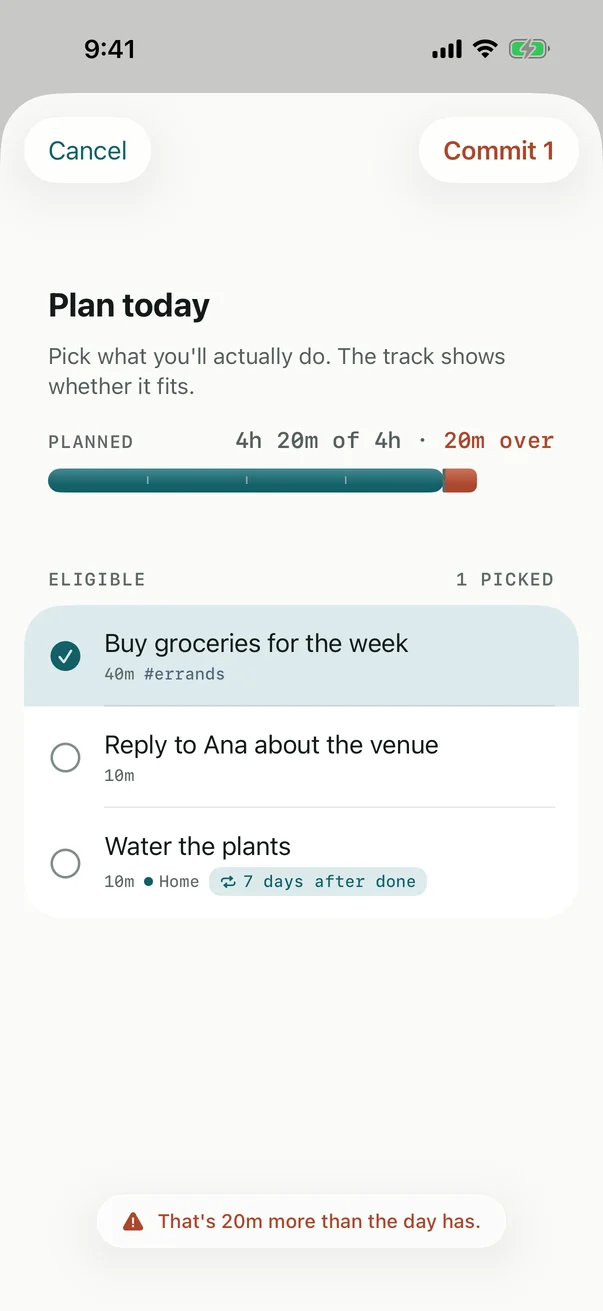
- Tap the tasks you’ll really do today. The track fills as you pick, and says so if you go over.
- Tap Commit. Those tasks move above the fold.
4. Work through it
Tap the circle beside a task to complete it. If the day changes, move a task below the fold with the arrow on its row; it stays there, ready for another day.
Tip
Turn on Subtract calendar busy time in Settings › Calendar, and your meetings come off the day’s capacity by themselves.
Checked against Billine 1.0