- On Today, tap Plan my day in the toolbar. When nothing is committed yet, the button is in the middle of the screen too.
- Tap each task you’ll really do today. The Planned track fills as you pick.
- If you go past your capacity, Billine says by how much: “That’s 10m more than the day has.” Unpick something, or pick something shorter.
- Tap Commit. The tasks you picked move above the fold.
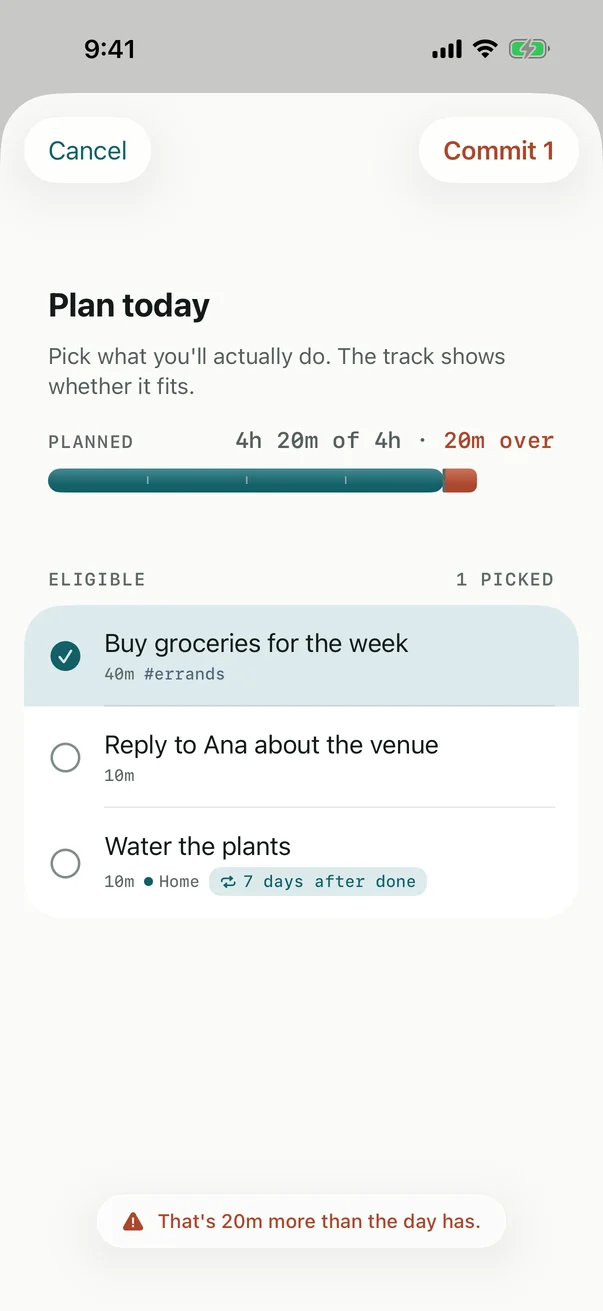
The list shows what’s eligible today: tasks whose do-date or deadline is today or earlier. Tasks without an estimate show without a length and add nothing to the track.
In the evening
After Evening starts at (8:00 PM by default), the same button reads Plan tomorrow, and the plan you make is for tomorrow.
Ten minutes free?
What now? answers a different question: “I have 25 minutes, what fits?” Tap the timer on Today, or press ⌘⇧W, choose how long you have and, if you like, a label. Billine lists what fits: committed tasks first, then the nearest deadline, then the longest that fits.
Checked against Billine 1.0