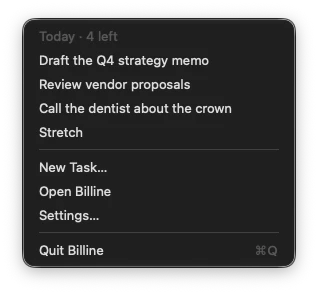
Click Billine’s icon in the menu bar to see today’s open tasks, how many are left, and four commands: New Task…, Open Billine, Settings… and Quit Billine.
Why Billine keeps running
When you close Billine’s last window, it stays in the menu bar with no Dock icon. That way ⌃⌥Space still opens a new task from any app, and your reminders still ring. Press ⌘Q, or choose Quit Billine in the menu, to quit it.
Hide the icon
In Settings, turn off Show in the menu bar. Closing the window then leaves Billine running in the Dock instead, and the shortcut keeps working.
Checked against Billine 1.0