Open Upcoming: a tab on iPhone, in the sidebar on iPad and Mac, or ⌘3.
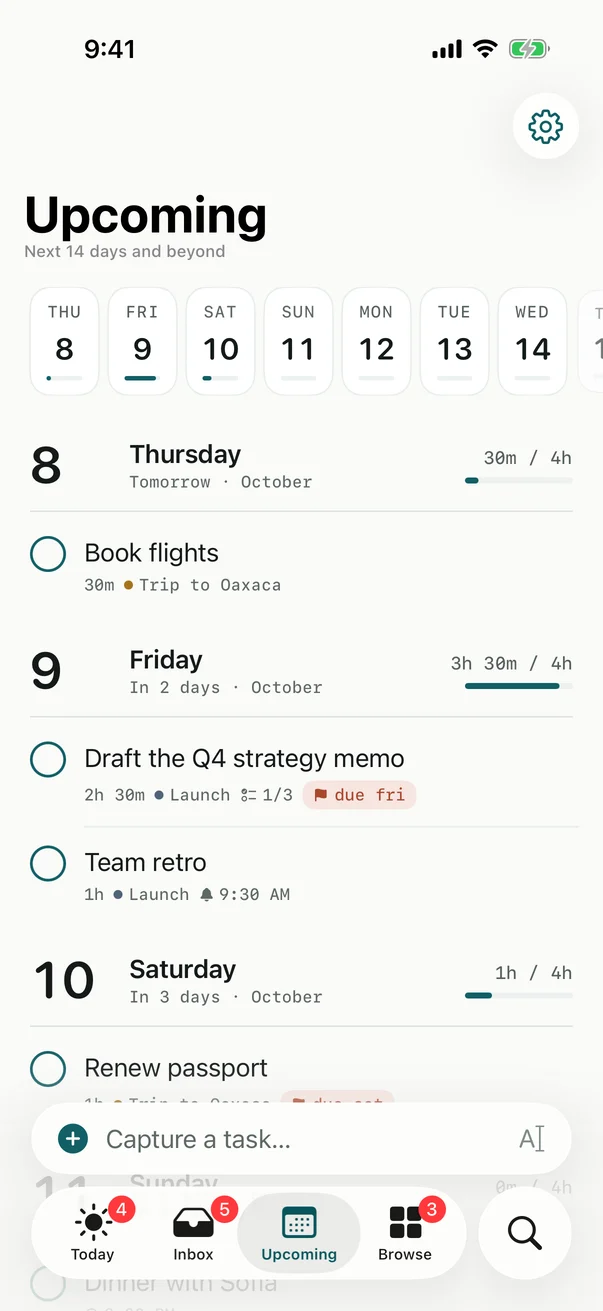
The strip
Across the top, one mark per day for the next fourteen days, with a line showing how loaded each one is. A day with more planned than your capacity shows in the warning colour. Tap a day to jump to it.
The days
Below, every day of the fortnight in order, each with planned of capacity, like 2h 15m of 4h, and its tasks. A day with nothing on it says Open. After the two weeks, only days that have tasks appear.
Tasks are listed under their do-date, or under their deadline if they have no do-date. Tap one to open it and move it to a lighter day.
Good to know
Upcoming measures each day against your plain daily capacity. Calendar meetings are taken out of today only.
Checked against Billine 1.0